Modules
Shesha promotes a modular approach to building applications. Instead of building everything from scratch, you package reusable functionality as Shesha modules and assemble those modules to deliver solutions efficiently. Shesha modules are distributed as regular NuGet packages and implement the SheshaModule class.
Shesha's modular approach builds on top of the ASP.NET Boilerplate module system and uses its initialization, dependency, and plug-in management capabilities. On top of this, Shesha lets a module embed and distribute configuration (such as form configurations) and initialize key module parameters during application startup.
A Shesha module can include a domain model, services, APIs, form configurations, reference lists, and other NuGet-like artifacts. If the module relies on custom front-end components and pages, the NuGet package should be accompanied by a matching NPM package containing the required front-end components.
View installed modules
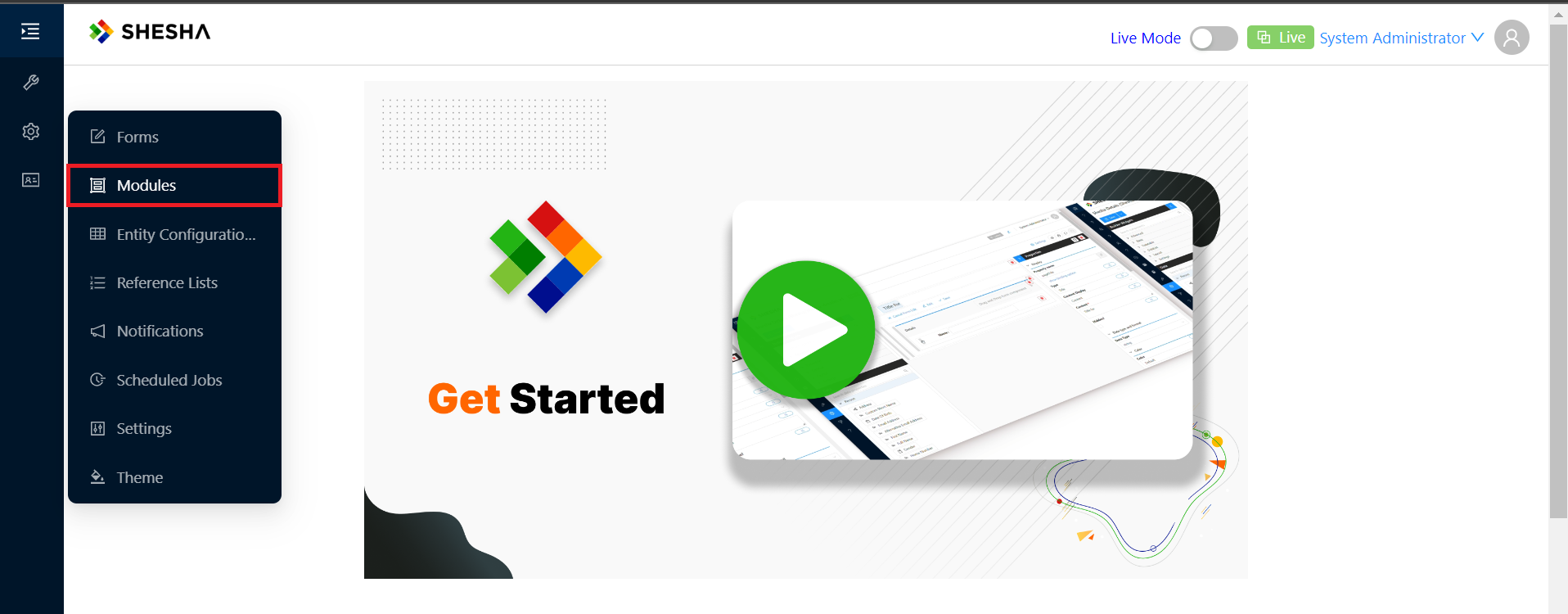
To view the modules installed in the application, open the Admin portal and select the Modules menu item.
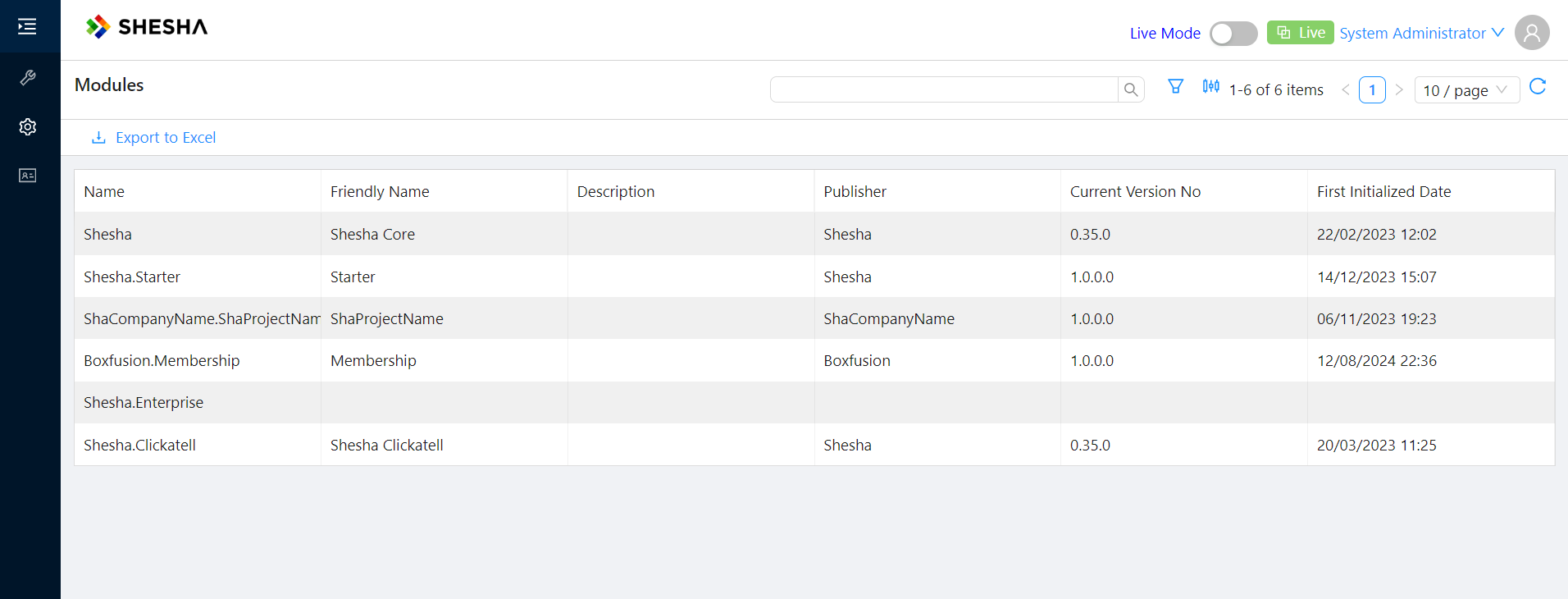
You then see the list of installed modules.
Module inheritance and hierarchy
Modules do not sit in isolation. An application defines an ordered hierarchy of modules, from the most general base modules up to your own application module. A typical hierarchy looks like this:
MyApp > ProductA > Shesha.Enterprise > Shesha.Core
Modules closer to your application take precedence over the base modules they build on. When the framework needs a configuration item by name, it walks the hierarchy from the highest-precedence module down to the lowest and uses the first matching item it finds. This means the most project-specific version of an item always wins, while base modules provide sensible defaults.
Customising a base module item with Expose
Because base module items are shared, you should not edit them directly. Instead you Expose the item into your own module. Exposing creates a protected copy in your module's scope that overrides the base version through the hierarchy described above, while leaving the original untouched. Your customisation is therefore insulated from future upgrades to the base module.
You expose items from the Configuration Studio. For the full explanation of how exposing and the hierarchy work together, see Expose and module hierarchy.
Create a new module
Add the SheshaModule class
Creating a module involves creating a new class library project and implementing the SheshaModule class. A Shesha module can be made up of one or more ASP.NET Boilerplate modules and assemblies. Whether to make an assembly a Shesha module depends on whether you need to associate configuration with it for distribution. If configuration distribution is not required, the assembly can be a regular ASP.NET Boilerplate module.
It helps to be familiar with the basics of the ASP.NET Boilerplate module system. Refer to the ASP.NET Boilerplate documentation.
A typical Shesha module class looks like this:
[DependsOn(
    typeof(CrmDomainModule),
    typeof(SheshaCoreModule),
    typeof(AbpAspNetCoreModule)
)]
public class CrmApplicationModule : SheshaModule
{
    public override SheshaModuleInfo ModuleInfo => new SheshaModuleInfo("AcmeCorp.Crm") {
        FriendlyName = "Customer Relationship Management",
        Description = "Module to help manage customer relationships and interactions.",
        Publisher = "AcmeCorp"
    };

    public override async Task<bool> InitializeConfigurationAsync()
    {
        // Import any configuration embedded as resources in this assembly on application startup.
        return await ImportConfigurationAsync();
    }

    public override void Initialize()
    {
        var thisAssembly = Assembly.GetExecutingAssembly();

        // Register IoC services
        IocManager.RegisterAssemblyByConvention(thisAssembly);

        // Scan the assembly for classes which inherit from AutoMapper.Profile
        Configuration.Modules.AbpAutoMapper().Configurators.Add(
            cfg => cfg.AddMaps(thisAssembly)
        );
    }

    public override void PreInitialize()
    {
        var thisAssembly = Assembly.GetExecutingAssembly();

        // Create controllers for all AppService classes in the assembly
        Configuration.Modules.AbpAspNetCore().CreateControllersForAppServices(
            typeof(CrmApplicationModule).Assembly,
            moduleName: "Crm",      // Module name used for the controller route
            useConventionalHttpVerbs: true);
    }
}
The value passed to the SheshaModuleInfo constructor is the module's globally unique Name. The options available on SheshaModuleInfo are shown below.
| Name | Description |
|---|---|
| Name | A globally unique name that follows a convention similar to .NET namespaces, for example MyOrg.MyModuleName. This is the constructor argument. |
| FriendlyName | A short, user-friendly name, for example "My Module Name". |
| Description | More detail about the module. |
| Publisher | The name of the publisher, typically your organisation name. |
| VersionNo | Version number. Used for manual versioning. For automatic versioning, use UseAssemblyVersion instead. |
| UseAssemblyVersion | If true, the module version matches the assembly file version. |
Specify the database prefix
If your module also contains domain classes, specify the database prefix by adding the following lines to the AssemblyInfo.cs file:
...
// Shesha specific attributes
// Specifying the prefix to use for database objects belonging to this project
[assembly: TablePrefix("Crm_")]
...
Embed configuration
To embed configuration in the module so it is distributed automatically during application startup, refer to the configuration distribution documentation.
Install a module
To install a module, follow these steps:
- Install the module as you would any regular NuGet package.
- If the module depends on custom front-end components, also install the matching NPM package or packages on the front-end.
- Any configuration embedded in the module is imported automatically during application startup. For more on how this works, refer to the configuration distribution documentation.
- Update the module classes of any project that depends on the new module to include it in the
DependsOnattribute. This ensures the module is loaded and initialized when the application starts. See the example below.
[DependsOn(
    typeof(SomeUsefulModule),
    typeof(SheshaCoreModule),
    typeof(AbpAspNetCoreModule)
)]
public class CrmApplicationModule : SheshaModule
{
    ...
}