Form Instance API
The form object is the current form: the data the user has entered, the mode it is in, the other components on it, and the functions to read, change, and submit it. It is available in every Shesha script and is the object most scripts spend their time in.
Reading Form State
form.data object
The form's current field values. Each property is named after the Property Name of a component on the form.
const firstName = form.data.firstName;
The top-level formData variable is the same data, so formData.firstName and form.data.firstName are interchangeable.
form.getFormData() function
Returns the form's current data. Use this where you need the freshest values rather than a copy captured earlier in the script, for example inside a callback that runs after an await.
const currentData = form.getFormData();
form.mode string
The current form mode, one of edit, readonly, or designer.
const getHidden = () => {
  // Hide the save button when the form is being viewed rather than edited.
  return form.mode === 'readonly';
};
form.state object
A store scoped to this form. It behaves like a plain object, so any property you set on it becomes available under that name to every script on the form. Use it for a value that several components on the form need to share but that is not a field on the record.
form.state.calculatedTotal = form.data.quantity * form.data.unitPrice;
form.components object
Typed access to the other components on the form, keyed by their Property Name. It lets a script read or drive another component, including a DataTable or a DataList, without reaching into Shesha's internals.
Form type to use: Table / List View - use when showing multiple records.
Example - Refresh a table after saving:
const onSubmitSuccess = () => {
  form.components.membersTable?.api?.refreshTable();
};
Example - Read the row a user has selected in a table:
const onClickAsync = async () => {
  const selected = form.components.membersTable?.selectedRow;
  if (!selected) {
    actions.showMessage.warning('Select a row first.');
    return;
  }
  actions.navigateToForm({ name: 'member-details', module: 'Membership' }, { id: selected.id });
};
Earlier versions of Shesha exposed a single selectedRow variable that pointed at the nearest table. It is no longer suggested or type-checked. Reading the component directly through form.components is explicit about which table you mean, which matters as soon as a page has more than one.
form.settings object
The form's own configuration, including modelType - the entity the form is bound to - and its configured getUrl, postUrl, putUrl, and deleteUrl.
console.log(form.settings.modelType);
form.modelType string
The entity type the form is bound to, if any.
form.defaultApiEndpoints object
The default CRUD API endpoints for the form's entity. Available only when the form's Model type is an existing entity.
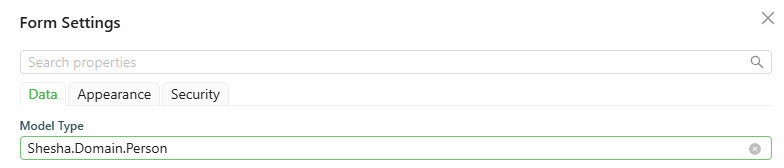
console.log(form.defaultApiEndpoints);
which logs:
{
  "read": {
    "httpVerb": "GET",
    "url": "api/dynamic/Shesha/Person/Crud/Get"
  },
  "list": {
    "httpVerb": "GET",
    "url": "api/dynamic/Shesha/Person/Crud/GetAll"
  },
  "create": {
    "httpVerb": "POST",
    "url": "api/dynamic/Shesha/Person/Crud/Create"
  },
  "update": {
    "httpVerb": "PUT",
    "url": "api/dynamic/Shesha/Person/Crud/Update"
  },
  "delete": {
    "httpVerb": "DELETE",
    "url": "api/dynamic/Shesha/Person/Crud/Delete"
  }
}
form.initialValues object
The values the form had when it first loaded, before the user changed anything. Useful for working out what has actually changed.
form.arguments object
The arguments passed to the form by whatever opened it, such as the values supplied when navigating to it or opening it in a dialog.
form.parentFormValues object
The field values of the parent form, when this form is rendered inside a SubForm.
Updating Form Data
form.setFieldsValue(values) function
Merges an object of field values into the form's current data. This is how a script changes what is on the form.
Form type to use: Edit Form - use when the user is updating an existing record.
Example - Build a full name from two other fields:
const onChange = () => {
  const { firstName, lastName } = form.data;
  form.setFieldsValue({ fullName: [firstName, lastName].filter(Boolean).join(' ') });
};
form.clear() function
Clears every field value on the form.
form.clear();
form.addDelayedUpdateData(data) function
Adds data to the form's deferred-update queue and returns the pending updates. Shesha uses this for child data that has to be saved after the parent record exists, such as newly uploaded files.
const groups = form.addDelayedUpdateData(form.data);
Submitting and Reporting Validation
form.submit() function
Submits the form, the same as the user clicking its submit button.
form.submit();
form.setValidationErrors(payload) function
Sets the validation errors shown by a Validation Errors component. It accepts a plain string, an API error response, or a caught Error, so you can usually hand it whatever you caught.
Form type to use: Edit Form - use when the user is updating an existing record.
Example - Show an API failure on the form:
const onClickAsync = async () => {
  try {
    await actions.callApi.post('/api/services/app/Members/Submit', form.data);
  } catch (error) {
    // Passing the caught error straight through surfaces the back-end's own messages.
    form.setValidationErrors(error);
  }
};
Advanced
form.formInstance object
The underlying Ant Design form instance. See the Ant Design Form documentation for its API.
form.shaForm object
The internal Shesha form instance. Prefer the properties and methods above for everyday scripting. This is an escape hatch into Shesha's own form machinery and is not covered by the compatibility guarantees the rest of this page carries.
Older Property Names
These names still resolve at runtime, so existing scripts keep working, but they are no longer suggested or type-checked in the editor.
| Old name | Use instead |
|---|---|
form.formMode | form.mode |
form.formSettings | form.settings |
form.formArguments | form.arguments |
form.context | form.state |
form.clearFieldsValue() | form.clear() |
form.setFieldValue(name, value) | form.setFieldsValue({ name: value }) |
form.setFormData(payload) | form.setFieldsValue(values) |