File Storage
Storing, displaying, and managing files is a common need in business applications, and Shesha provides built-in file management to handle it. These features include:
- APIs for uploading, downloading, deleting, and updating files, including version management.
- UI components that bind to entities and allow uploading, downloading, and viewing of files.
- Storage providers that allow files to be kept in different storage locations. Local file storage and Azure Blob Storage are supported out of the box, and you can implement custom providers.
- Metadata management for every file uploaded.
Adding a file to an entity
To upload a single file against an entity, add a property of type StoredFile to the entity:
public class MyEntityWithFile : Entity
{
    ...

    public virtual StoredFile MyFile { get; set; }

    ...
}
On the front-end, use the File form component and bind it to your new StoredFile property.
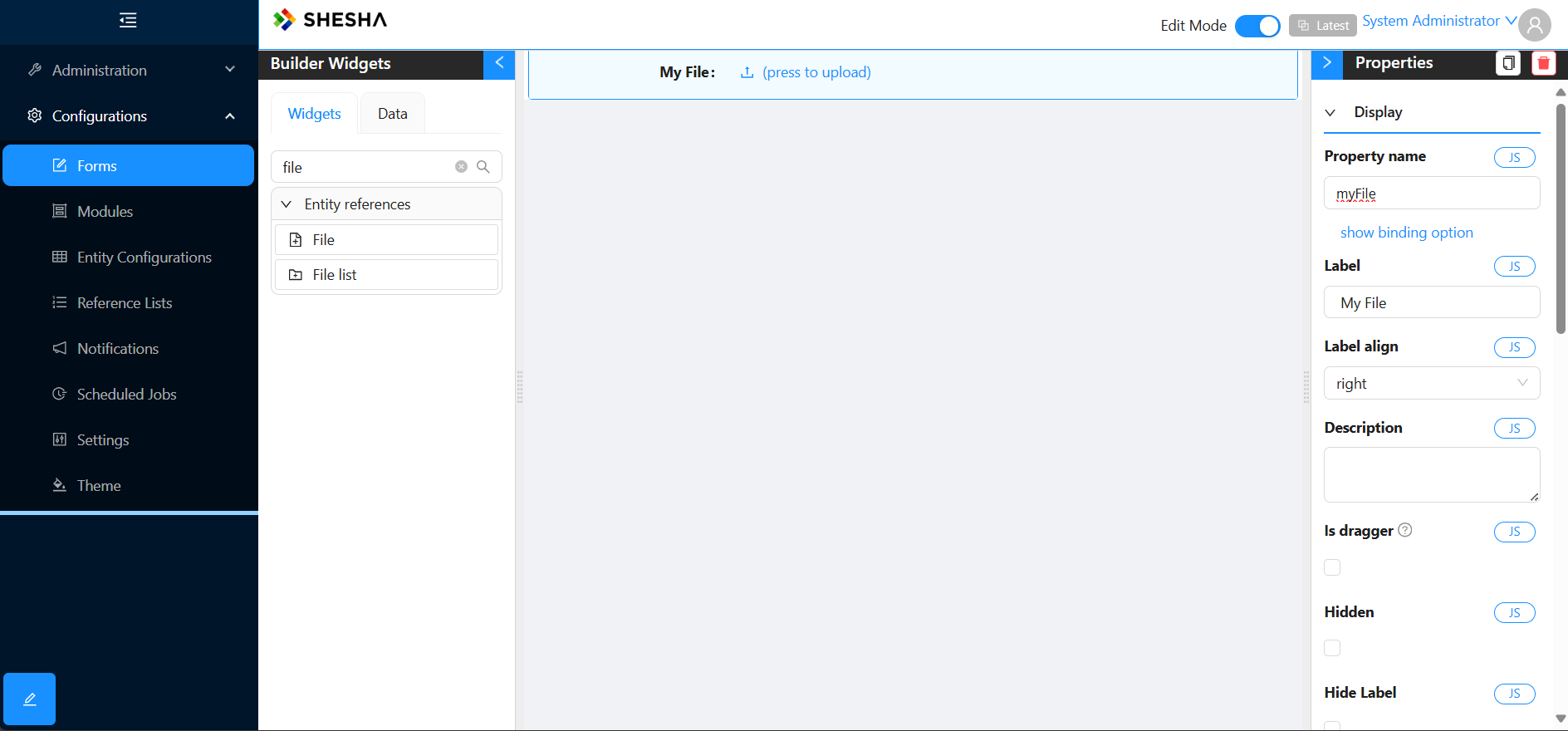
Refer to the File form component for more on how to configure the component.
Adding a list of files to an entity
To upload a list of files against an entity, no changes are required to your domain model. Add the FileList form component to your form and bind it to your entity.
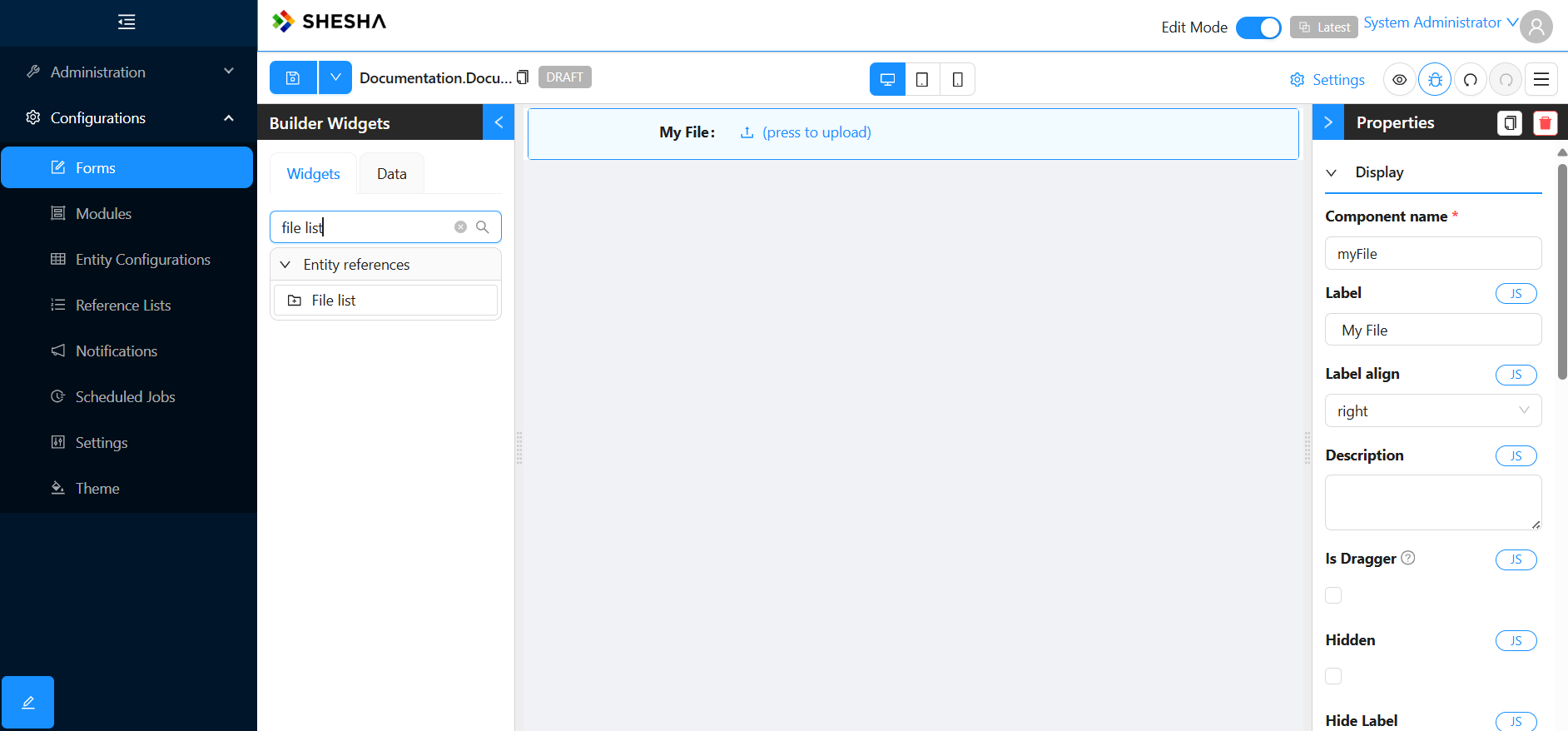
The FileList component automatically tracks which files belong to the list using the Owner and Category properties of the StoredFile entity. It can only update these properties accurately if it is configured correctly. Refer to the FileList form component for more on how to configure the component.
When files are uploaded before the owner entity has been saved (and therefore before it has an Id), the dynamically generated Create endpoint automatically updates the Owner and Category properties of those StoredFile entities once the owner has been saved and assigned an Id. See Temporary files and delayed binding for more details.
The [StoredFile] property attribute
Apply the [StoredFile] attribute to StoredFile properties to control file storage behaviour. It supports the following parameters.
| Parameter | Type | Description |
|---|---|---|
IsVersionControlled | bool | If true, uploading a new file creates a new version instead of overwriting. Default is false. |
IsEncrypted | bool | If true, the file content is encrypted when stored. Default is false. |
Accept | string | A file type filter (for example ".pdf,.docx") that restricts which file types can be uploaded. |
Example - Version-control a contract document and restrict its file types:
public class ContractEntity : Entity
{
    [StoredFile(IsVersionControlled = true, Accept = ".pdf,.docx")]
    public virtual StoredFile ContractDocument { get; set; }
}
StoredFile entity and file metadata
The StoredFile entity stores metadata about files uploaded into the application and has the following properties.
| Property | Type | Description |
|---|---|---|
| Owner | GenericEntityReference | A generic reference to the file's owning entity. Stores both the owner's Id and type, so a file can be linked to any entity in the system. See GenericEntityReference for more details. |
| FileName | string | The original name of the file. When saved in the storage location, the original name is replaced by a Guid to avoid clashes, so this preserves a view of the original name. |
| FileType | string | The type of the file. |
| Category | string | The category of the file. Used to group files when several file lists are attached to the same entity. |
| Description | string | The description of the file. |
| SortOrder | int | The sort order of the file. |
| ParentFile | StoredFile | The parent file of the current file. Used to reference related files, such as a template used to generate this file. |
| Folder | string | The folder where the file is stored, relative to the root of the storage location. |
| IsVersionControlled | bool | Indicates whether the file is version controlled. See File versioning for details. |
| Temporary | bool | If true, indicates the file was uploaded before being linked to an owner entity. See Temporary files and delayed binding. |
| TenantId | int? | The Id of the tenant. |
StoredFileVersion
Each upload creates a StoredFileVersion record. When version control is enabled, previous versions are preserved; otherwise the existing version is overwritten.
| Property | Type | Description |
|---|---|---|
| File | StoredFile | The StoredFile this version relates to. |
| VersionNo | int | The version number. |
| FileSize | Int64 | The size of the file in bytes. |
| FileName | string | The name of the file in the storage location. This differs from the original name because it is replaced with a Guid when stored to ensure uniqueness. |
| FileType | string | The type of the file, taken from the file extension when uploaded. |
| Description | string | An optional description for the file version. |
| IsLast | bool | If true, this is the latest version of the file. |
| IsSigned | bool | If true, this file version has been digitally signed. |
File versioning
File versioning controls whether uploading a new file replaces the existing content or creates a new version in the history.
Version-controlled files (IsVersionControlled = true)
- Each upload creates a new version with an incremented
VersionNo. - All previous versions are preserved and can be retrieved.
- The
IsLastflag onStoredFileVersionmarks the most recent version.
Non-version-controlled files (default)
- Uploading a new file overwrites the existing version.
- Only the latest content is available.
You can enable version control in two ways. The first is the [StoredFile] attribute on the entity property, which is recommended for design-time configuration:
[StoredFile(IsVersionControlled = true)]
public virtual StoredFile MyDocument { get; set; }
The second is at runtime, by calling the UploadNewVersion API endpoint, which automatically enables version control on the file.
File management API
The StoredFile API provides endpoints for uploading, downloading, managing, and deleting files. All endpoints are available under /api/StoredFile/.
Upload
| Endpoint | Method | Description |
|---|---|---|
/Upload | POST | Upload a file. Supports three upload modes via the filesCategory parameter (see below). |
/UploadNewVersion | POST | Upload a new version of an existing file. Automatically enables version control if not already enabled. |
The upload mode determines how the file is linked.
| Mode | Description |
|---|---|
| property | The file is linked to a specific StoredFile property on an entity. Specify ownerType, ownerId, and propertyName. |
| attachment | The file is added as a categorized attachment to an entity. Specify ownerType, ownerId, and optionally filesCategory. |
| temporary | The file is uploaded without an owner. The Temporary flag is set to true. See Temporary files and delayed binding. |
The common upload parameters are:
| Parameter | Description |
|---|---|
ownerType | The full class name of the owning entity. |
ownerId | The Id of the owning entity. |
propertyName | The name of the StoredFile property on the entity (property mode). |
filesCategory | A category label to group related files (attachment mode). |
Download
| Endpoint | Method | Description |
|---|---|---|
/Download | GET | Download a file by id. Optionally specify versionNo to download a specific version. |
/DownloadZip | GET | Download multiple files as a single ZIP archive. Pass a list of file ids. |
/DownloadThumbnail | GET | Get a thumbnail image for a stored file. Specify id, width, and height. |
Downloads are tracked by the framework. Each download records which user accessed the file and when.
File information
| Endpoint | Method | Description |
|---|---|---|
/Get | GET | Retrieve metadata for a specific file by id. |
/GetFileVersions | GET | Get all versions for a version-controlled file by id. |
Delete
| Endpoint | Method | Description |
|---|---|---|
/Delete | DELETE | Delete a file and all its versions by id. |
/DeleteFile | DELETE | Delete a file by ownerType, ownerId, and fileId. |
Temporary files and delayed binding
In many UI workflows, a user uploads files while filling in a form for a new entity that has not yet been saved. Because the entity does not have an Id yet, the file cannot be linked to an owner immediately.
Shesha handles this with temporary files:
- The file is uploaded using the temporary upload mode. The
Temporaryflag onStoredFileis set totrue. - The user completes the form and saves the entity, which creates it in the database and assigns an Id.
- The dynamically generated Create endpoint automatically detects any temporary files associated with the form and updates their
Ownerreference andCategoryto link them to the newly created entity.
This process is transparent when using the File and FileList form components, because the front-end handles the temporary upload and deferred binding automatically.
Storage of files
Uploaded files are not stored in the database. Instead, they are kept as separate binary files in a file storage location. Shesha supports the following locations:
- Local disk
- Azure Blob Storage
To store files elsewhere, implement a custom storage provider by extending StoredFileServiceBase (see Custom storage providers).
Storage provider selection
The IsAzureEnvironment setting in appsettings.json controls which storage provider is used.
IsAzureEnvironment | Provider | Description |
|---|---|---|
true | Azure Blob Storage | Files are stored in Azure Blob Storage. |
false (default) | Local file storage | Files are stored on the local file system. |
Local file storage
When IsAzureEnvironment is false (or not set), files are stored on the local file system.
The upload folder is controlled by the Shesha.UploadFolder setting, which can be configured in the application's settings or in appsettings.json. If it is not specified, the framework uses a default folder within the application's directory.
Files are stored using the pattern:
{UploadFolder}/{StoredFileVersionGuid}.{extension}
Each file version is saved with a unique Guid-based filename to avoid clashes.
Azure Blob Storage
When IsAzureEnvironment is true, files are stored in Azure Blob Storage. Update your appsettings.json as follows:
{
  "ConnectionStrings": {
    "Default": "Data Source=...; Initial Catalog=...;",
    "BlobStorage": "<your-azure-storage-connection-string>"
  },
  "CloudStorage": {
    "ContainerName": "files",
    "DirectoryName": "your-subdirectory-name"
  },
  "IsAzureEnvironment": true
}
| Setting | Description |
|---|---|
ConnectionStrings:BlobStorage | The Azure Storage connection string. |
CloudStorage:ContainerName | The name of the blob container. Defaults to "files" if not specified. |
CloudStorage:DirectoryName | Optional. A subdirectory within the container used to organise files. |
IsAzureEnvironment | Must be set to true to enable Azure Blob Storage. |
The blob container is created automatically if it does not exist.
Custom storage providers
To store files in a different environment (for example Amazon S3, Google Cloud Storage, or SFTP), implement a custom storage provider by extending StoredFileServiceBase. This is the same base class that the built-in AzureStoredFileService extends. The base class handles all metadata, versioning, and attachment logic, so your implementation only needs to handle the physical storage input and output.
See Implementing a custom file storage provider for a full walkthrough with a sample implementation.
Backend file services
Shesha provides the IStoredFileService interface for working with files in your backend code. This service is injected via dependency injection and handles all file operations, including upload, download, versioning, and attachment management.
Injecting the service
using Shesha.Services;

public class MyAppService : ApplicationService
{
    private readonly IStoredFileService _fileService;

    public MyAppService(IStoredFileService fileService)
    {
        _fileService = fileService;
    }
}
Common operations
Example - Create a new file from a stream:
using var stream = new MemoryStream(fileBytes);
var version = await _fileService.CreateFileAsync(stream, "report.pdf", file =>
{
    file.SetOwner(myEntity); // Link to an entity
    file.Category = "Reports";
    file.Description = "Monthly report";
});
Example - Update file content:
// Update an existing file with new content
using var stream = new MemoryStream(newContent);
var version = await _fileService.UpdateFileAsync(existingFile, stream, "updated-report.pdf");

// Or update a specific version's content directly
var latestVersion = await _fileService.GetLastVersionAsync(existingFile);
using var stream2 = new MemoryStream(newContent);
await _fileService.UpdateVersionContentAsync(latestVersion, stream2);
Example - Download or read file content:
// Get file content as a stream
var stream = await _fileService.GetStreamAsync(storedFile);

// Get a specific version's content
var version = await _fileService.GetLastVersionAsync(storedFile);
var versionStream = await _fileService.GetStreamAsync(version);

// Track that the current user downloaded the file
await _fileService.MarkDownloadedAsync(version);
Example - Work with attachments:
// Get all files attached to an entity
var attachments = await _fileService.GetAttachmentsAsync(myEntity);

// Get files in a specific category
var invoices = await _fileService.GetAttachmentsOfCategoryAsync(myEntity, "Invoices");

// Check if an entity has attachments in a category
bool hasPhotos = await _fileService.HasAttachmentsOfCategoryAsync(myEntity, "Photos");

// Get all attachment categories for an entity
var categories = await _fileService.GetAttachmentsCategoriesAsync(myEntity);

// Get the latest version of each attachment
var latestVersions = await _fileService.GetLastVersionsOfAttachmentsAsync(
    myEntity.Id, "MyModule.MyEntity", "Documents");
Example - Copy files between entities:
// Copy a single file to a new owner
var copiedFile = await _fileService.CopyToOwnerAsync(sourceFile, destinationEntity);

// Copy all attachments from one entity to another
await _fileService.CopyAttachmentsToAsync(sourceEntity, destinationEntity);
Example - Manage versions:
// Get all versions of a file
var versions = await _fileService.GetFileVersionsAsync(storedFile);

// Get or create a new version
var newVersion = await _fileService.GetNewOrDefaultVersionAsync(storedFile);
Example - Delete a file:
// Delete a file and all its versions (from both the database and storage)
await _fileService.DeleteAsync(storedFile);
Example - Rename a file:
await _fileService.RenameFileAsync(storedFile, "new-name.pdf");
Key service methods reference
| Method | Description |
|---|---|
CreateFileAsync(stream, fileName, prepareAction?) | Create a new file and return the created version. |
UpdateFileAsync(file, stream, fileName) | Update an existing file with new content and name. |
GetStreamAsync(file) | Get the content stream of the latest version. |
GetStreamAsync(fileVersion) | Get the content stream of a specific version. |
GetLastVersionAsync(file) | Get the most recent version of a file. |
GetFileVersionsAsync(file) | Get all versions of a file. |
GetNewOrDefaultVersionAsync(file) | Create a new version or return the default (for non-versioned files). |
UpdateVersionContentAsync(version, stream) | Update the binary content of a specific version. |
GetAttachmentsAsync(owner) | Get all files attached to an entity. |
GetAttachmentsOfCategoryAsync(owner, category) | Get files attached to an entity filtered by category. |
HasAttachmentsOfCategoryAsync(owner, category) | Check if an entity has any files in a category. |
GetAttachmentsCategoriesAsync(owner) | Get distinct category names for an entity's files. |
CopyToOwnerAsync(file, newOwner) | Copy a file to a different owner entity. |
CopyAttachmentsToAsync(source, destination) | Copy all attachments from one entity to another. |
MarkDownloadedAsync(fileVersion) | Record that the current user downloaded a version. |
RenameFileAsync(file, fileName) | Rename a file. |
DeleteAsync(storedFile) | Delete a file and all its versions from storage and the database. |
FileExistsAsync(id) | Check whether a file exists. |
GetOrNullAsync(id) | Get a file by Id, or null if not found. |