Implementation
If your project's login page is not yet wired up to the configurable Shesha/login form, open src/app/login/page.tsx in your frontend project, remove its entire content, and replace it with the snippet below.
Locate the File
The file lives under your project's src/app folder, alongside the other route folders such as account and dynamic.
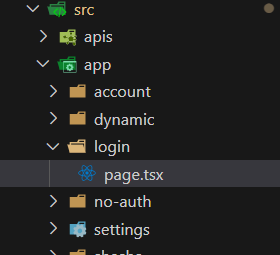
Replace the Content
'use client';

import React from 'react';
import {
  ConfigurableForm,
  FormFullName,
  LOGIN_CONFIGURATION,
  PageWithLayout,
} from '@shesha-io/reactjs';

interface IProps {}

const Login: PageWithLayout<IProps> = () => (
  <ConfigurableForm mode={'edit'} formId={LOGIN_CONFIGURATION as FormFullName} />
);

export default Login;
LOGIN_CONFIGURATION is a constant exported by @shesha-io/reactjs that points at the Shesha/login form described in Design. Passing it to ConfigurableForm in edit mode renders that form as the login page, so any changes you make to the form in the designer are reflected here without touching this file again.