App Context
contexts.appContext is a shared data store scoped to the whole application session. It's created once when the application loads and stays alive as the user navigates between pages, unlike pageContext (cleared when you navigate to a different page) or formContext (cleared when a form closes). Use it to share a value across unrelated pages and forms in the same session, such as a setting or flag that several different screens need to check.
Contexts let you keep several separate stores of data and layer extra configuration on top of a form. For example, you could use a checkbox bound to App Context to toggle whether certain fields elsewhere on the page are required or visible, or use the length of some text to decide whether to show a warning.
Accessing App Context
contexts.appContext
Binding a Component to App Context
Any component with a Property Name can be pointed at App Context instead of the form's own data, by setting its Context property to appContext. Once bound this way, the component reads its value from App Context and writes changes back to App Context, rather than to the form's data object.
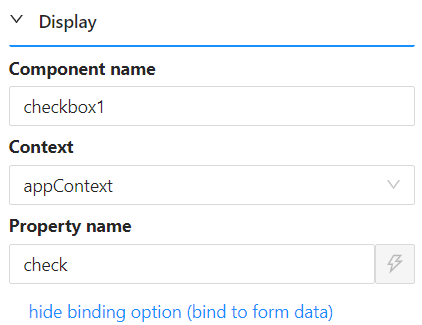
Reading and Writing App Context from a Script
Reading a value from App Context works the same way as reading any other variable:
const isChecked = contexts.appContext.agreedToTerms;
Assigning directly to a field, like contexts.appContext.agreedToTerms = true, does not save the change. Scripts receive a snapshot copy of the context's data, so a plain assignment only changes that copy. To actually update App Context from a script, call the context's own setFieldValue method instead.
contexts.appContext.setFieldValue('agreedToTerms', true);
Example
Form type to use: Any form with a Checkbox component whose Context is set to appContext and whose Property Name is agreedToTerms.
Example - Read a value from App Context in a Text component's Content expression:
return contexts.appContext.agreedToTerms
  ? 'Thanks for agreeing!'
  : 'Please agree to continue.';
Example - Update App Context from a button's On Click action:
contexts.appContext.setFieldValue('agreedToTerms', true);